



Agentic development is a step beyond “prompting” or autocomplete. It’s a way of working where your AI tool operates more like a true engineering partner: it understands project context, follows standards, and helps you reason through design and implementation choices.
In this guide, we’ll share 10 advanced techniques for agentic development with Claude Code, including how to set up AI-assisted development workflows, define engineering standards for AI, use specialized AI agents, apply spec-driven development, and manage context, cost, and token usage so teams can scale AI-enabled software delivery with confidence.
1. Engineering Standards for AI: Codify Guidelines Claude Code Can Follow
Before you start coding with Claude, invest time in building a set of doc files that define your engineering guidelines. These act as your project’s “mental model,” the rules Claude will follow as it writes and refactors code.
Keep them descriptive but concise. Avoid lengthy explanations or unnecessary elaboration, as too much text consumes context tokens and can dilute the model’s focus. Instead, aim for clear, high-signal guidance like naming patterns, architecture principles, and testing conventions.
Organize your docs by layer, for example:
- /docs/frontend-guidelines.md
- /docs/backend-guidelines.md
- /docs/infrastructure-guidelines.md
Reference these files in your CLAUDE.md or AGENT.md so they are automatically loaded into context during each session. This ensures Claude applies your standards consistently without you needing to reintroduce them manually.
If your organization supports it, host these files on an MCP (Model Context Protocol) server. This allows your entire engineering org to share the same standards across projects, ensuring Claude always operates from a single source of truth for structure and style.
2. Specialized AI Agents in Claude Code: Build Teammates for Focused Work
Claude allows you to build specialized agents, think of them as dedicated teammates with their own strengths and personalities. These agents are defined in the ./.claude/subagents directory, where each one can be configured with its own purpose, tone, and focus area. You can assign agents to different domains such as test automation, frontend development, backend services, Docker, Terraform, or any other area of expertise relevant to your project.
You can also make this fun by giving them themed personalities. Our CTO created a fleet of superhero agents, including Tony Stark, whose job was to “think outside the box and innovate” when faced with complex challenges. It adds personality while reinforcing the mindset behind each role.
When Claude Code encounters a task that matches one of your defined specializations, it will automatically assign a sub-agent to handle that part of the work. Each sub-agent runs within its own isolated context window, separate from the main session, allowing it to focus deeply on its specific problem space without polluting the broader project context.
3. Reusable AI Development Workflows: Standardize Multi-Step Execution
Define workflows to run a single prompt through a series of predefined steps. Store them in ./.claude/workflows, and describe each workflow in a concise .md file that lists the ordered commands. Workflows shine when you want the same multi step routine applied every time, without re-explaining your process.
Each workflow should be descriptive but concise, with numbered steps that clearly map to real actions. If a step always requires a specialist, you can explicitly call a sub agent to handle it.

This structure gives you a repeatable pipeline, consistent quality checks, and clear handoffs between sub agents and the main session.
4. Spec-Driven Development with AI: Acceptance Criteria That Claude Can Execute
In traditional development with AI, you often fall into one of two extremes, either you give a single vague prompt and hope for the best, or you only trust AI with isolated micro tasks. Spec Driven Development gives you the best of both worlds.
In this approach, you create a spec file that defines the Acceptance Criteria of the story or feature you’re working on, along with any key technical details. For larger stories, your spec can include multiple tasks that Claude will iterate over sequentially until completion.
A typical spec file might include:
- The Acceptance Criteria (AC)
- The expected user flow
- A series of tasks needed to meet the AC
- A final validation step that tests the user flow end to end
One of the most powerful ways to use this is to collaborate with a specialized Claude agent to draft the spec itself. Once you’ve refined it into a format Claude can easily interpret, feed that spec into a feature development workflow (like the one from Hack #3) as the prompt to execute.
The philosophy here is that humans are no longer doing the mechanical work of coding, we’re defining what needs to be built and how success is measured. By combining Spec Driven Development with your agents, workflows, and standardized docs, you give AI a framework to deliver high-quality, consistent code that aligns with your intent.
For more on this concept, check out this excellent open-source toolkit from GitHub:
Spec-Kit.
5. Choose the Right Claude Model: Haiku vs Sonnet vs Opus for Engineering Tasks
When you start a Claude chat, you can specify which model to use. Each model consumes tokens differently and is optimized for different types of work. Choosing the right model for the task is critical to getting the most value out of Claude and staying within your usage limits.
Use the Claude Haiku model for lightweight, fast tasks such as drafting your spec files, generating boilerplate, or writing simpler functions. Haiku is the cheapest and quickest model, perfect for tasks where speed matters more than deep reasoning.
Use the Claude Sonnet model for most of your day-to-day feature development. Sonnet provides a strong balance between intelligence and performance, making it ideal for core development and autonomous agent workflows. It costs more tokens than Haiku but produces higher-quality reasoning and code generation.
Reserve the Claude Opus model for complex or exploratory tasks, such as architecture refactoring, large-scale design decisions, or deep research. Opus is the most capable and most expensive model, best suited for strategic and reasoning-intensive work.
Remember, Claude has usage limits within each 5-hour and weekly window, so managing which model you use directly impacts both your cost and productivity.
6. Model Context Protocol (MCP): Build Shared Knowledge for Scalable Agentic Development
As mentioned in the first technique, hosting your engineering standards on an MCP (Model Context Protocol) server ensures a single source of truth for Claude’s contextual understanding. But this idea doesn’t need to stop at coding standards, it can scale into a shared agentic platform across your entire organization.
Host all your Claude assets, including subagents and workflows, on an MCP server. By centralizing these artifacts, every project and every developer automatically benefits from the same conventions and Claude tooling. This eliminates drift between teams and keeps your organization’s AI development environment fully aligned.
The MCP server acts as the shared memory layer for your company’s agentic ecosystem. It allows teams to build tools collaboratively, share new workflows, and evolve best practices over time without having to manually distribute updates across repositories.
There are already several platforms embracing this approach. Services like GitHub and Atlassian now offer custom MCP server integrations, allowing Claude to securely access your code base, issues, and documentation. This unlocks powerful capabilities such as autonomous agents performing code reviews, refactors, or feature delivery directly in context, accelerating development while maintaining organizational consistency.
This approach turns your organization’s use of Claude from isolated productivity wins into a cohesive, living platform that grows stronger with every interaction.
7. Token and Cost Observability: Measure ROI Across Agents, Workflows, and Prompts
Claude’s API and SDKs provide access to detailed message-level metrics, including token consumption. Building observability around these metrics is key to understanding how efficiently your agents, workflows, and specs are operating.
By integrating Claude’s cost and token usage data into a dashboard or logging system, you can pinpoint where tokens are being spent the most, identify inefficiencies in prompts or workflows, and refine your architecture for better cost control. This helps ensure your AI systems deliver the highest return on investment (ROI) without waste.
These insights can also guide model selection (as discussed in Hack #5) and prompt refinement, ensuring each task uses the right model at the right complexity level. Over time, these analytics help you balance performance, accuracy, and cost across your entire agentic stack.
For implementation details and SDK examples, refer to Claude’s documentation here:
Cost Tracking with Claude’s API and SDK.
8. Claude Code Session Continuity: Resume Work Without Losing Context
While Claude Code doesn’t yet have the same ability as Claude Chat to reference and merge other conversations into a new context, it does support resuming previous sessions directly. This makes it easy to pick up where you left off without losing valuable context or setup time.
You can quickly restart a previous development session using the CLI:

This command resumes your most recent chat session, restoring all context and previous exchanges.
If you need to revisit a specific project or bug discussion, use:

This will display a list of all your prior chat sessions with Claude Code, allowing you to select and reopen any of them.
This feature is especially helpful when:
- A bug surfaces in QA from a previous feature discussion.
- Your token limit was hit mid-session.
- You simply want to continue a long-running feature or refactor without reloading docs and context manually.
By resuming prior sessions instead of starting new ones, you save tokens, preserve continuity, and let Claude seamlessly re-engage with all the relevant context needed to fix bugs or complete unfinished work.
Parallel AI Development with Git Worktrees: Avoid Context Bleed Across Branches
Git worktrees let you check out multiple branches into separate directories. When used with Claude Code, which treats each Claude launch as its own session, you unlock some really powerful capabilities. You can spin up a worktree per branch, open Claude in each, and develop multiple features in parallel — or fix bugs in one directory while building new functionality in another, all with clean, isolated context.
Quick start
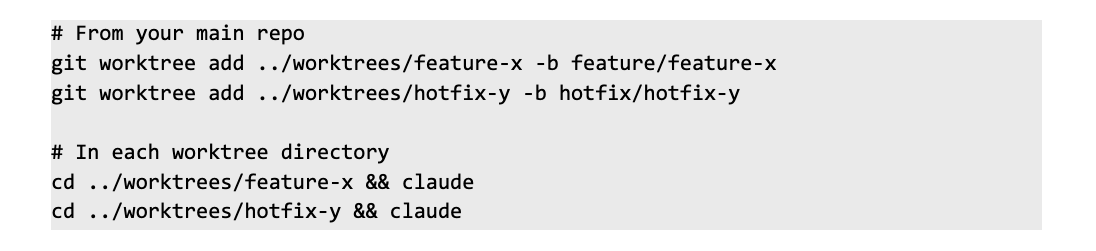
Why it works
- Each directory has its own filesystem context, so Claude loads only the files, specs, and configs for that branch.
- Sessions stay isolated, reducing token waste and preventing cross-branch context bleed.
- Works seamlessly with your subagents and workflows.
More details:
Run parallel Claude Code sessions with Git worktrees.
Design Patterns for AI-Assisted Development: Speak Claude’s Architecture Language
Claude Code is incredibly capable when given clear and structured instructions, but the quality of its output depends on the clarity and precision of your guidance. One of the best ways to improve that communication is to strengthen your understanding of common design patterns, data structures, and algorithms.
Claude is not just a code generator, it is a developer that understands formal concepts like the strategy, template, observer, factory, or repository patterns. Instead of writing long, verbose prompts explaining how to structure your application, you can simply say, “Implement this feature using the strategy pattern” and Claude will immediately produce code that aligns with that architectural approach.
Knowing these foundational concepts makes your collaboration with Claude more effective, consistent, and scalable. It enables you to speak its language, reducing token usage and avoiding confusion.
Finally, even with AI assistance, code review remains essential. Understanding algorithms and design principles helps you spot when Claude’s output might not meet performance expectations or deviate from your intended design. This awareness allows you to guide Claude more precisely in subsequent revisions and improves both your codebase and your AI-assisted workflow over time.
Related: The Ultimate AI Tooling Guide
🎧 Want to hear more from industry leaders?
Check out The Forward Slash Podcast — featuring thoughtful conversations with the people and ideas driving technology forward.

.svg) Article
Article